

This guide shows how to install the Iptanus File Upload plugin and start using it. If the plugin is already installed, go straight to step 2.
Step 1 — installing the free version
- Install it as you would any other plugin. Go to Dashboard → Plugins → Add New and type “Iptanus File Upload” in the search box. It appears as the first result. Press Install Now.
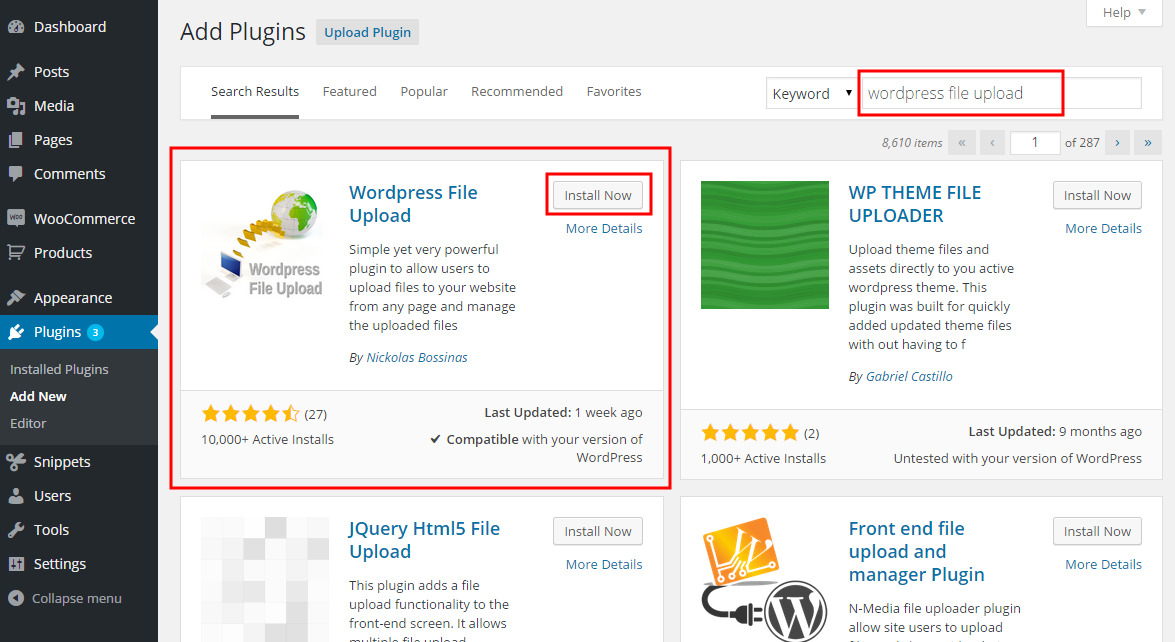
- When the installation finishes, press the Activate link.
- You can also install from a .zip file instead, using the Upload Plugin option shown in the image above.
Step 1 — installing the Pro version
- The Pro version is installed only from the .zip file you received when you bought the plugin. Go to Dashboard → Plugins → Add New and press the Upload Plugin button at the top of the screen, as shown in the image above.
- Choose the file from your computer and press Install Now.
- When the installation finishes, press the Activate link.
Step 2 — adding the plugin to a page or post
This step is the same for the free and the Pro version.
- Go to Dashboard → Settings → Iptanus File Upload. At the bottom of the screen is the Plugin Instances table. Press Add Plugin Instance:

- Choose the page or post from the dropdown and press OK.
- The plugin now appears in the Plugin Instances table.
Then follow this guide to configure the plugin with its visual editor.
If you have any further questions, please contact us.
The Iptanus team
Hi,
I’m installing the PRO version, keep getting this error message:
Plugin could not be activated because it triggered a fatal error.
Parse error: syntax error, unexpected ‘[‘ in */wp-content/plugins/wordpress-file-upload-pro/lib/wfu_functions.php on line 2555
Please assist
Hi, can you please upgrade your PHP to version 5.6 or newer? if not let me know for an alternative solution.
Regards
Nickolas
Hi Nickolas,
I’m using the Pro Version. Two questions…
1) How do I setup email notifications to admin when a new file has been uploaded?
2) When trying to use the upload page on a mobile device I get a red error box that sates “ERROR: No Site Key. Please Contact Administrat…” . How do I go about fixing this so that files can be uploaded via mobile devices?
Any help or guidance on the above would be appreciated.
Cheers,
Richard
False alarm on question 2, figured that one out. Replying to you on another thread re question 1.
Cheers,
Richard
Hi,
I’ve just bought your plugin and have an issue with uploading files :-(.
At the moment I visit the website page where the upload plugin is activated and select a file which i want to upload, than it would not be vissible in the input field and upload button does not light up.
After a refresh of the page then I’m able to select the file and the button light up and able to upload the file ?
So how can i fix this ?
Best regards,
Leo
Hi, can you send me the URL of the page to try myself?
Regards
Nickolas