

The Iptanus File Upload plugin does not only upload files; it also displays them. There are two ways to show what has been uploaded: in the Dashboard, for logged-in users, and on a page or post, for anyone.
The Dashboard file viewer
The Dashboard file viewer lets logged-in users see and manage the files they have uploaded, from Dashboard → Iptanus File Upload:

To open this screen up to your users, set their permissions in the plugin’s Settings. View, download, edit and delete permissions can be set for each role, and for individual users:
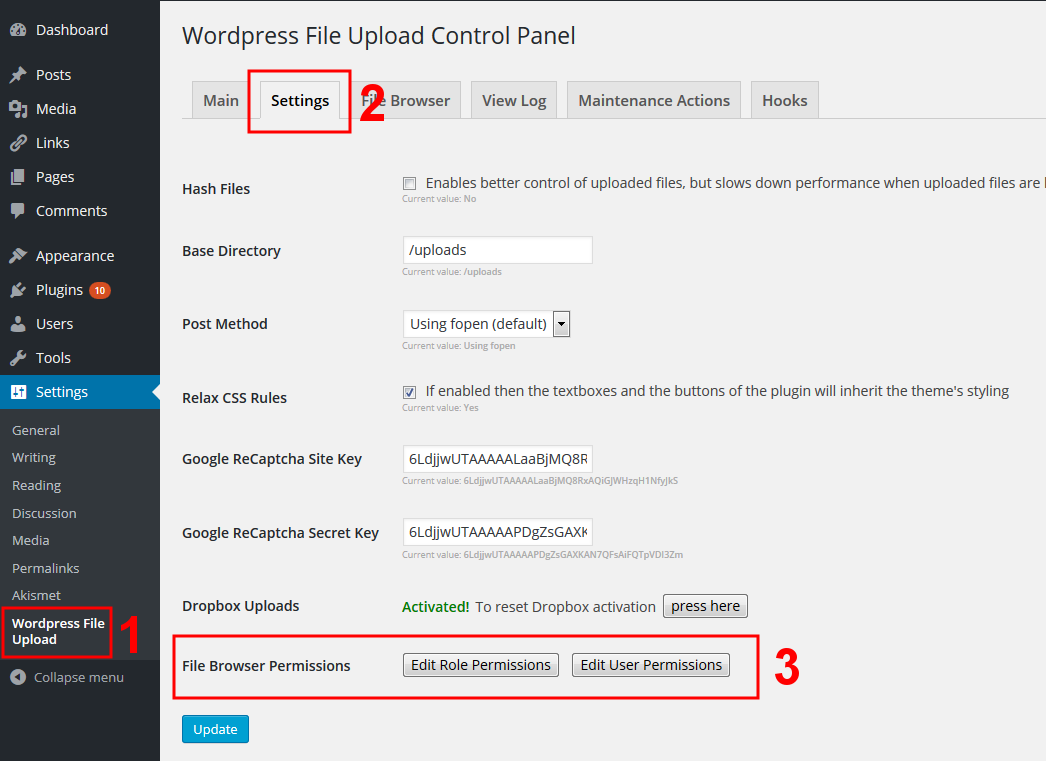

This viewer works for logged-in users only, and each user sees only their own files.
The front-end file viewer
The front-end file viewer shows uploaded files to any visitor, logged in or not:
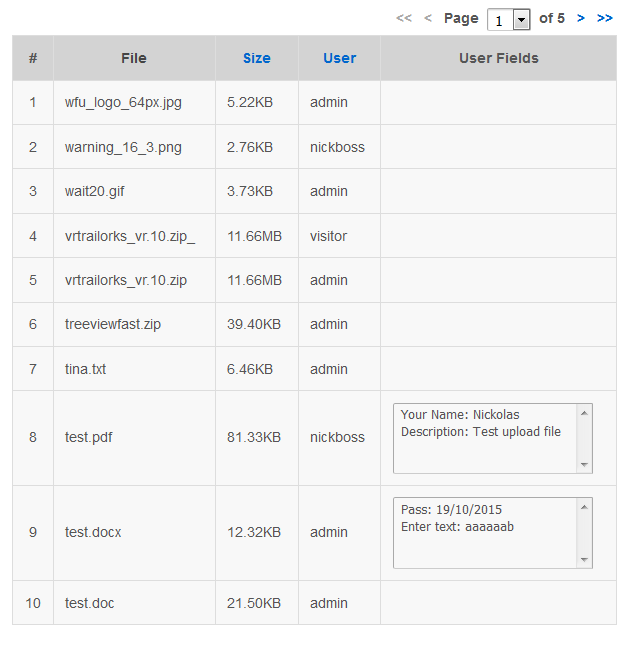
It can be added to any page or post, either by typing the [wordpress_file_upload_browser] shortcode into the contents, or by opening the plugin’s Main page in the Dashboard and adding a new Uploaded File List Instance:

What you can configure
The front-end viewer has a wide set of options: which roles and users may see the list, which files appear in it, what actions are allowed, what information is shown, and what the column headings say.
You can set these by hand, as attributes inside the shortcode — the full list is in the File List Attributes section of the plugin’s support page. The easier way is the shortcode composer:

The front-end viewer carries minimal styling of its own, so that it inherits your theme’s. Its elements do have their own CSS classes, so you can restyle any part of it.
If you have questions or need further information, please contact us.
The Iptanus team
I use “Ultimate Member” to prohibit logged user to back-end. Can “The Front-End File Viewer” let logged user see their own files in front-end?
Yes it can. Regards
Nickolas
Sorry! I missed a word. I meant logged users can “Only” see their own files.
Hi, yes the front-end file viewer can be configured so that it is visible only to logged users and logged users can see only their own files.
Regards
Nickolas
I need to change the date format shown in front end file viewer. I have translated po files, my wp is not in english, posts show the date correctly in catalan (the site language), but your plugin shows the month name in english.
How can i change the date format of date column to dd/mm/yyyy (all numeric)?
Hi, the latest version of the plugin contains filters for reconfiguring the columns of the file viewer. Here are instructions for you:
1. Go to Dashboard / Settings / WordPress File Upload / Hooks and add a new hook.
2. Give it any title you want.
3. Put the following code in Code box:
if (!function_exists('wfu_file_browser_edit_column_date_handler')) {function wfu_file_browser_edit_column_date_handler($cell, $file, $additional_data) {
$cell["contents"] = date('d/m/Y', $file['mdate']);
$cell["sort_value"] = $file['mdate'];
return $cell;
}
add_filter('wfu_file_browser_edit_column-date', 'wfu_file_browser_edit_column_date_handler', 10, 3);
}
4. Set Status to Active and Save.
You are done.
Regards
Nickolas
I’m looking for a plugin that would allow my unconnected visitors to upload photos on a order page but it would be necessary that the uploaded photo is also visible on the page of the upload form the time they choose the options that we propose.
can your pro plugin do that?
thank you
Hi, the plugin can allow visitors (unconnected users) to uploads photos. These photos can be shown in any page using the plugin’s file viewer. However I do not understand the last part. Do you want the photos to be visible conditionally using some options? what kind of options?
Regards
Nickolas