
Suppose you want visitors to upload files to your site, and to be able to see and download what they have uploaded.
This article shows how to build a simple front-end file browser for files uploaded through the Iptanus File Upload plugin. It appears beneath the upload form, like this:

The steps
You will need Code Snippets, a third-party plugin that lets you hook into the filters and actions of Iptanus File Upload.
1. Install Code Snippets.
2. Go to Snippets in your Dashboard and create a new snippet.
3. Give it any name you like, and paste the following into the Code box:
if (!function_exists('wfu_before_file_upload_handler')) {
    function wfu_before_file_upload_handler($file_path, $file_unique_id) {
      $_SESSION['wfu_tempfiles'][$file_unique_id] = $file_path;
      return $file_path;
  }
  add_filter('wfu_before_file_upload', 'wfu_before_file_upload_handler', 10, 2);
}
if (!function_exists('wfu_after_file_upload_handler')) {
  function wfu_after_file_upload_handler($file_unique_id, $upload_result, $error_message, $error_admin_messages) {
    if (isset($_SESSION['wfu_tempfiles'][$file_unique_id]) && $_SESSION['wfu_tempfiles'][$file_unique_id] != '')
      $_SESSION['wfu_uploadedfiles'][$file_unique_id] = array('path' => $_SESSION['wfu_tempfiles'][$file_unique_id], 'time' => time() );
  }
  add_action('wfu_after_file_upload', 'wfu_after_file_upload_handler', 10, 4);
}
if (!function_exists('custom_gallery_output')) {
  function custom_gallery_output($output, $atts, $instance) {
	if ( isset($atts['override']) && $atts['override'] == 'true' ) {
	  $showempty = false;
	  $file_items = array();
	  $time_items = array();
	  foreach ($_SESSION['wfu_uploadedfiles'] as $item) {
		if ( file_exists($item['path']) ) {
		  $key = array_search($item['path'], $file_items);
		  if ( $key === false ) {
			array_push($file_items, $item['path']);
			array_push($time_items, $item['time']);
		  }
		  elseif ( $item['time'] > $time_items[$key] ) {
			$file_items[$key] = $item['path'];
			$time_items[$key] = $item['time'];
		  }
		}
	  }
	  if ( count($file_items) == 0 && !$showempty ) return "<div></div>";
	  $output = '<div class="wfu_file_list">';
	  $output .= "\n\t".'<label>Your uploaded files</label>';
	  $output .= "\n\t".'<table>';
	  $output .= "\n\t\t".'<thead>';
	  $output .= "\n\t\t\t".'<tr>';
	  $output .= "\n\t\t\t\t".'<th>#</th>';
	  $output .= "\n\t\t\t\t".'<th>File</th>';
	  $output .= "\n\t\t\t\t".'<th>Date</th>';
	  $output .= "\n\t\t\t".'</tr>';
	  $output .= "\n\t\t".'</thead>';
	  $output .= "\n\t\t".'<tbody>';
	  if ( count($file_items) == 0 ) {
	    $output .= "\n\t\t\t".'<tr>';
		$output .= "\n\t\t\t\t".'<td colspan="3">No files uploaded yet</td>';
	    $output .= "\n\t\t\t".'</tr>';
	  }
	  else {
		$i = 0;
		foreach ($file_items as $key => $item) {
		  $i++;
		  $output .= "\n\t\t\t".'<tr>';
		  $output .= "\n\t\t\t\t".'<td>'.$i.'</td>';
		  $output .= "\n\t\t\t\t".'<td><a href="'.site_url().'/'.substr($item, strlen(ABSPATH)).'">'.wfu_basename($item).'</a></td>';
		  $output .= "\n\t\t\t\t".'<td>'.date('d/m/Y G:i:s', $time_items[$key]).'</td>';
		  $output .= "\n\t\t\t".'</tr>';
		}
	  }
	  $output .= "\n\t\t".'</tbody>';
	  $output .= "\n\t".'</table>';
	  $output .= '</div>';
	  return $output;
	}
	else return '';
  }
  add_filter('post_gallery', 'custom_gallery_output', 10, 3);
}
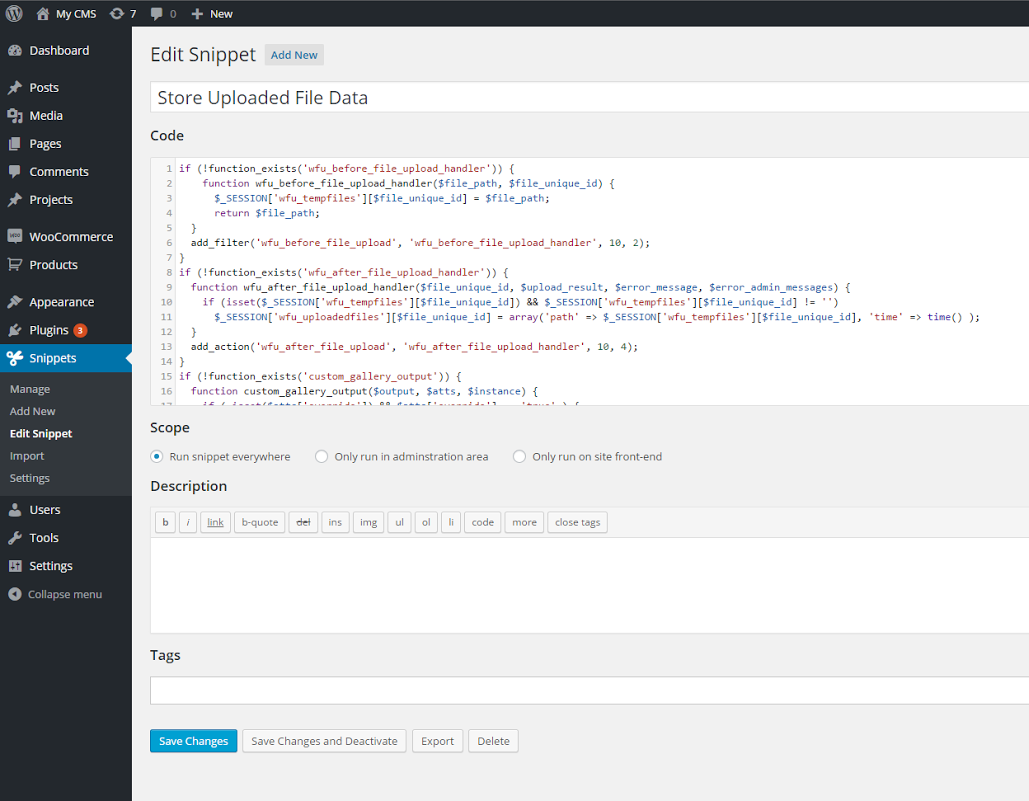
4. Leave the other options as they are and press “Save Changes and Activate”. It should look like this:
5. Open the Shortcode Composer for your upload form, go to the Interoperability tab, and switch on “Attach Uploaded Files To Post” and “Show Image Gallery Below Plugin”. Then put override=”true” in “Image Gallery Options” — this part matters. Finally switch on redirection and set the redirect link to the page itself.
You can do the same by adding this to the shortcode directly: postlink=”true” gallery=”true” galleryoptions=”override=%dq%true%dq%” redirect=”true” redirectlink=”your page“
6. That is all. A visitor opening the page sees only the upload form. Once they upload a file or several, the page reloads and the list of their files appears beneath the form, ready to download.
What each visitor sees
Each visitor sees only their own files. The list is held in session variables — temporary storage unique to that visitor — so once they close the browser and the cookies expire, the files are no longer listed. That is the right behaviour for someone who is not logged in.
This is a small demonstration of what the plugin’s filters and actions can do. If all you need is a file list, the plugin now has file viewers of its own, in the Dashboard and on the front end, with permissions per role and per user.
If you have questions or need assistance, please contact the Iptanus team.
Ask a question
Answered by Iptanus, usually within a working day.