
The European Union’s General Data Protection Regulation (GDPR) took effect on 25 May 2018. Any site holding personal data about people in the EU has to comply with it, wherever that site is run from.
The Iptanus File Upload plugin takes files, and optionally other information alongside them, and can pass the files on to somewhere else — an FTP server, Dropbox and so on. Whatever is submitted through the upload form is recorded in the site’s database, so that the details stay attached to the file they came with. Plenty of site owners depend on that record.
Which means some of it is very likely to be personal data: an upload form asking for a name and an email address certainly is, and depending on what they contain, so are the files. The plugin therefore has to comply too.
Version 4.5.0 brought in the features that make it GDPR-compliant:
- It asks for consent before files and data are submitted.
- Nothing submitted is written to the database if consent is withheld.
- Where the files themselves count as personal data, they are not stored either.
- People can see their consent status on their profile page, and give, revoke or clear it whenever they like.
- They can ask you for a copy of what you hold, and the plugin gives you a straightforward way to export it in a readable format.
- They can ask you to erase it, and the plugin gives you a way to erase one person’s data.
Switching personal data protection on
These features are off to begin with, so that the plugin behaves exactly as it did before on sites that have not opted in. Switch them on whenever you like, from the plugin’s Settings in the Dashboard:

The Personal Data option is the switch. A site with no reason to comply — one with no visitors from the EU, say — can leave it off and carry on as before.
Configuring the upload form
If what an upload form collects is personal data, consent is needed before any of it can be stored, so the shortcode has to be set up to ask for it. What follows depends on the answer:
- Consent given: everything is submitted and stored as normal.
- Consent withheld: the upload still goes through, but nothing is stored on the site.
The question is asked only once. The plugin remembers the answer and applies it to every later upload, until that person changes it.
Asking for consent
Start by deciding whether a given upload form needs to ask at all, which depends on what it collects. The shortcode composer has a Personal Data tab for the consent attributes, and Ask for Consent is the one that decides:
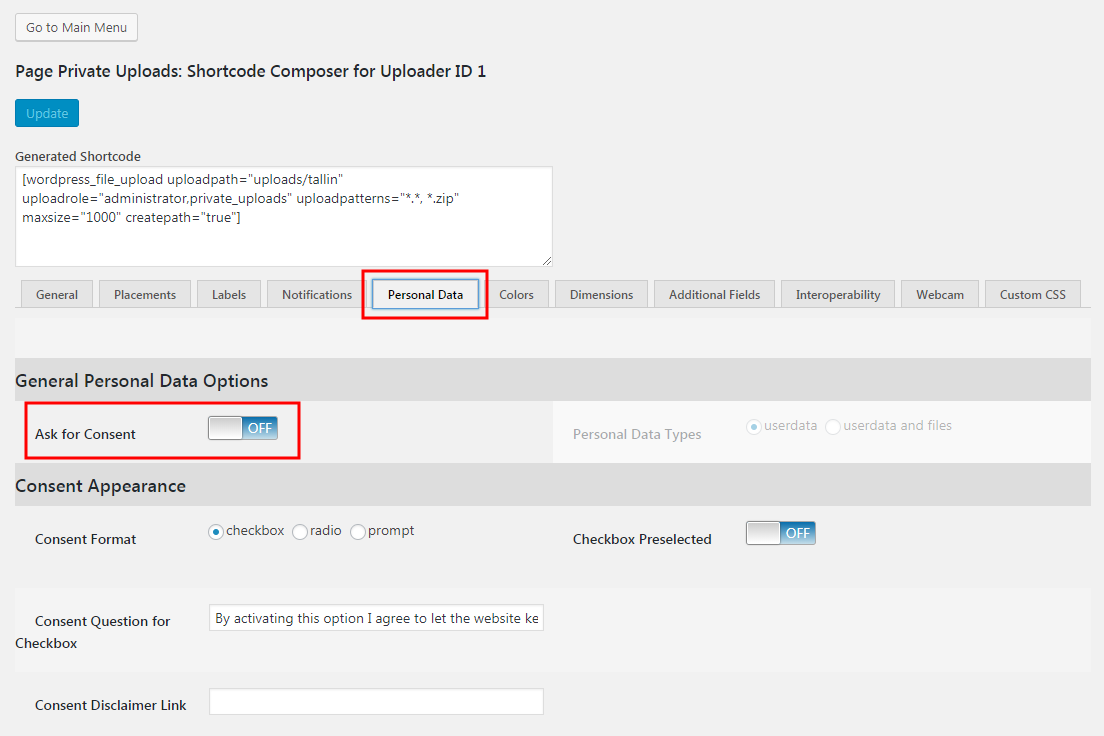
With it on, Personal Data Types decides what counts as personal: the additional form fields alone, which is the default, or the files as well.

How the question is put
The Consent Format attribute offers three shapes for the question: checkbox, radio and prompt.

Checkbox
The default. The question appears in the form as a checkbox:

Leaving it unticked means consent is withheld, and the submitted name is not stored. You can have the box ticked to begin with, through the Checkbox Preselected option:

So the checkbox will show up preselected in the upload form.
Radio buttons
The question comes with a Yes and a No, one of which must be chosen:

Press Upload Files with neither selected and the upload is stopped, with a message saying the question has not been answered:

Prompt
Nothing appears in the form itself. Instead a confirmation dialog opens when Upload File is pressed:

OK gives consent; Cancel withholds it. Either way the upload proceeds — only the storing of the data depends on the answer.
Where the question sits
For the checkbox and radio formats, the question’s position is set on the Placements tab, like every other component of the form:

Drag the Consent component wherever you want it.
The wording of the question
The text itself comes from the Consent Question for Checkbox attribute on the Personal Data tab. Despite the name, it supplies the wording for all three formats.

You can put a link in that text, pointing at a disclaimer or a legal notice. Surround a word with colons to turn it into one — write :disclaimer: and the word “disclaimer” becomes the link. Its destination is the Consent Disclaimer Link attribute:

The form then looks like this:

What people can do with their data
Under the GDPR, people have more say over their own personal data: they can ask for a copy of it, ask for it to be deleted, or withdraw permission for it to be kept at all, whenever they choose. The plugin supports all three, with screens for them and for you.
Changing consent
The plugin remembers the answer to the consent question so that it is not asked again on every upload. To change that answer, a user goes to their profile, where the plugin adds a section called Iptanus File Upload Consent Status:
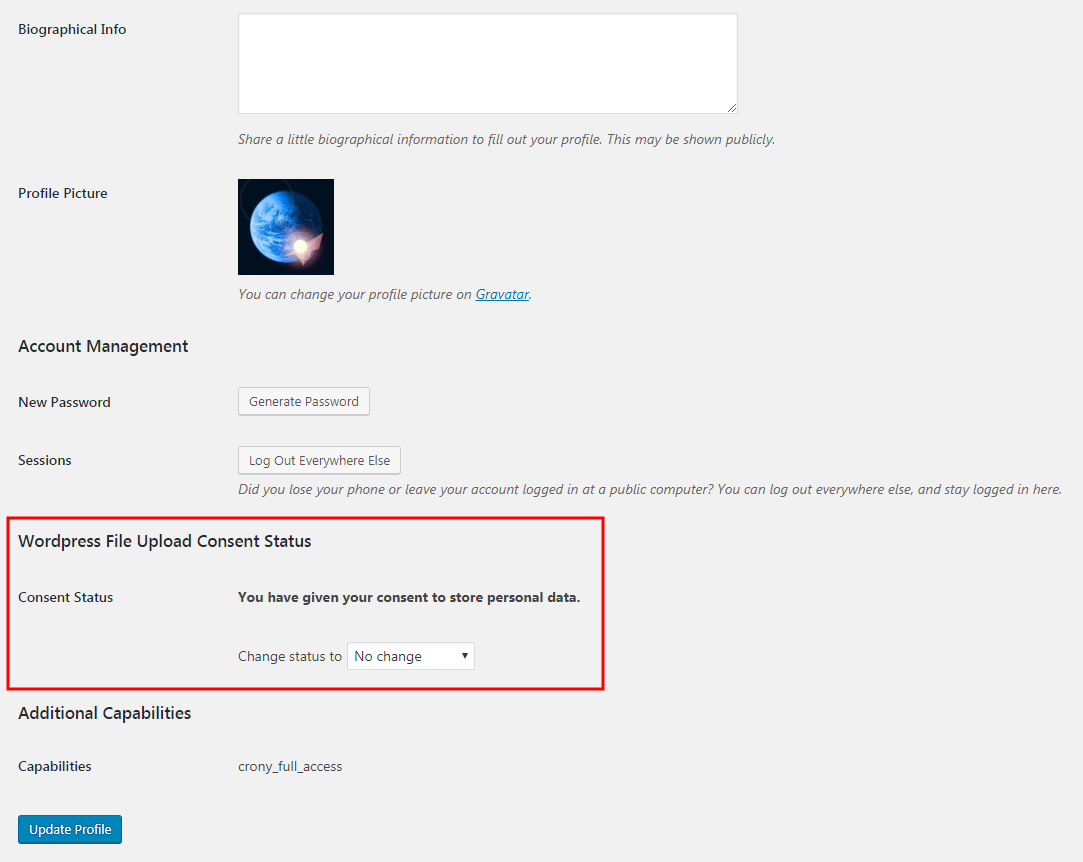
Consent Status shows where things stand, and the drop-down below it changes them. Which options appear depends on the current state:
- give consent
- revoke consent
- clear consent, which makes the question appear on the upload form again
The change is saved with the Update Profile button.
Exporting someone’s data
Anyone may ask you for a copy of the personal data you hold about them. The plugin’s Dashboard area has a Personal Data tab for this, with an Export File Data of User button:

Choose the person first, in the Select User area: start typing a username and matches appear as you go. Wildcards work too — put asterisks (*) around the text and every username containing it is listed:

With the person selected, press Export File Data of User. The plugin pulls their file data out of the database, writes it to a comma-separated values (.csv) file and offers it to you to save:

Save it and send it on.
Erasing someone’s data
People may also ask for their personal data to be erased altogether, and you need to be able to do it. The same Personal Data tab erases the stored data of one person:

Select the person as before and press Erase All User Data. You are asked to confirm before anything happens:

Press Yes and two things happen:
- the additional data they submitted is deleted from the database;
- any database record naming them as the uploader has that information stripped out.
Note that the files themselves are kept. If someone has asked for those to go as well, delete them yourself.
For more information, please contact us.
The Iptanus team
Is there a way to FORCE the user to give consent before upload. eg NOT allow upload until consent is given?
Yes, instructions sent to your email.
Regards
Nickolas
Can you share or post the instructions to FORCE the user to give consent before upload. eg NOT allow upload until consent is given?
I will answer to you by email because comments will not accept code
Nickolas
Could you please provide these to me as well? We would like a user to provide consent on every upload,not just the first time.
Thanks!
Hi, sure, how do you want the consent question to work?
Nickolas
As Ben asked before: I would also like to know if there is a way to force the user to give consent before upload. eg not allow upload until consent is given?
That would be great!
Hi, I answered to your email
Regards
Nickolas