

This guide shows how to install the Iptanus File Upload plugin and start using it. If the plugin is already installed, go straight to step 2.
Step 1 — installing the free version
- Install it as you would any other plugin. Go to Dashboard → Plugins → Add New and type “Iptanus File Upload” in the search box. It appears as the first result. Press Install Now.
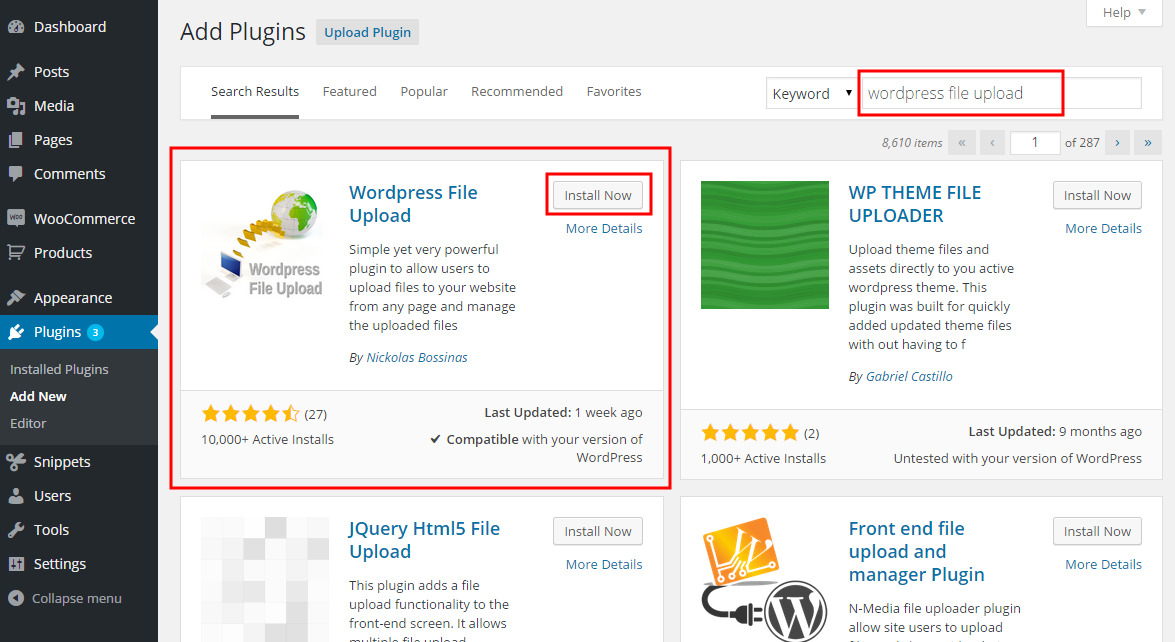
- When the installation finishes, press the Activate link.
- You can also install from a .zip file instead, using the Upload Plugin option shown in the image above.
Step 1 — installing the Pro version
- The Pro version is installed only from the .zip file you received when you bought the plugin. Go to Dashboard → Plugins → Add New and press the Upload Plugin button at the top of the screen, as shown in the image above.
- Choose the file from your computer and press Install Now.
- When the installation finishes, press the Activate link.
Step 2 — adding the plugin to a page or post
This step is the same for the free and the Pro version.
- Go to Dashboard → Settings → Iptanus File Upload. At the bottom of the screen is the Plugin Instances table. Press Add Plugin Instance:

- Choose the page or post from the dropdown and press OK.
- The plugin now appears in the Plugin Instances table.
Then follow this guide to configure the plugin with its visual editor.
If you have any further questions, please contact us.
The Iptanus team
Huh well it looks like the best plugin but all I get when I click the select file is the selector and then I pick it and it goes back to a blank form field. upload button never lights up. got a weird little yellow crayon/pencil in the upper left.
6.1x
https://wordpress-914914-3315952.cloudwaysapps.com/index.php/2023/02/27/welcome-to-cloudways/
Bom dia preciso muito da sua ajuda estou tentando aprovar a compra do plugin pela minha empresa mais toda vez que ativo o programa só consigo utiliza-lo na no preview do site, quando publico a pagina ele simplesmente fica 100% inativo teria alguma solução para me ajudar vou lhe mandar abaixo o shortcode e a link da pagina:
[wordpress_file_upload uploadpatterns=””*.*, *.zip, *.rar, *.7z, *.dwg, *.nwd, *.rvt, *.xls, *.xlsx, *.doc, *. docx, *.pdf, *.jpg, *.jpeg, *.tif, *.tiff”” maxsize=”500″ duplicatespolicy=”maintain both” blockcompatibility=”auto” placements=”title/webcam/filename+selectbutton+uploadbutton/subfolders/userdata/message” webcam=”true” webcamselfile=”true” audiocapture=”true” webcamstartoff=”true” webcamswitch=”true” maxrecordtime=”90″]
https://comepimakeupexperience.com.br/gravacao-camera/