

This guide shows how to install the Iptanus File Upload plugin and start using it. If the plugin is already installed, go straight to step 2.
Step 1 — installing the free version
- Install it as you would any other plugin. Go to Dashboard → Plugins → Add New and type “Iptanus File Upload” in the search box. It appears as the first result. Press Install Now.
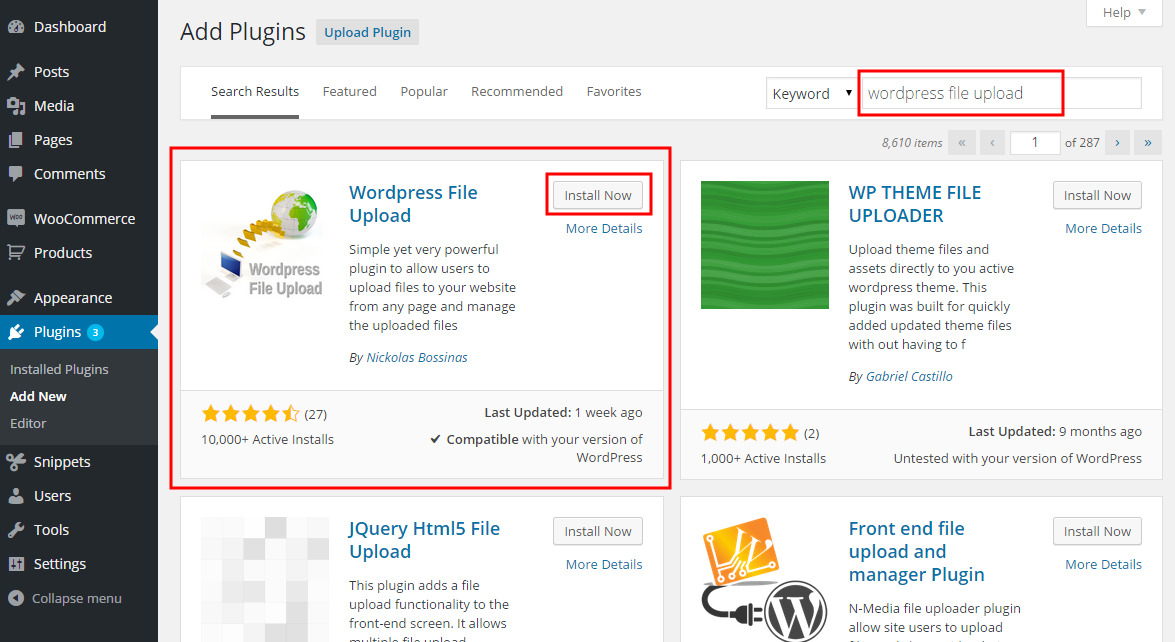
- When the installation finishes, press the Activate link.
- You can also install from a .zip file instead, using the Upload Plugin option shown in the image above.
Step 1 — installing the Pro version
- The Pro version is installed only from the .zip file you received when you bought the plugin. Go to Dashboard → Plugins → Add New and press the Upload Plugin button at the top of the screen, as shown in the image above.
- Choose the file from your computer and press Install Now.
- When the installation finishes, press the Activate link.
Step 2 — adding the plugin to a page or post
This step is the same for the free and the Pro version.
- Go to Dashboard → Settings → Iptanus File Upload. At the bottom of the screen is the Plugin Instances table. Press Add Plugin Instance:

- Choose the page or post from the dropdown and press OK.
- The plugin now appears in the Plugin Instances table.
Then follow this guide to configure the plugin with its visual editor.
If you have any further questions, please contact us.
The Iptanus team
Hi, I can’t include more than 1 recipient for the notification email. Just one is sent, more than one aren’t. I tried to specify more recipients in several way for them to be separed: comma, slash, space, combination of the previous… Any suggestion? Thank you.
Hi, can you send me the shortcode?
Regards
Nickolas
Hello, I need to show up my images in a thumbnails, I copy and paste this shortcode to show this images [wordpress_file_upload_browser], but just show me the URL path Screen-Shot-2021-04-29-at-16-26-41.png.. I need to display the images, please help. I have the premium version of the plugin.
Thank you
Hi, you can read this article which shows how to add thumbnails in the file viewer, or even convert it into a gallery.
Regards
Nickolas
Hi,
we have encountered some serious problems with the WordPress File Upload Pro plugin in recent times.
For some reasons the upload worked fine for some customers but then stopped working with no apparent cause for others. The upload button was grayed out, no loading bar progress, and no file uploads.
It is essential for us to manage user uploads, this has caused enormous inconvenience to handle 300+ file uploads from our users in one week when half failed to upload properly.
Since we switched to wordpress 6.0.2 the problem seems to have disappeared but we are approaching a period with a large amount of uploads and we do not know whether to trust the plugin, after the bad experience.
The plugin has always been reliable in the past, we would like to make sure it still is. Would there be a way to check that it is working stably before putting it back online?
Otherwise we will be forced to change service provider.
I look forward to hearing from you
Thank you
—–
Wordpress 6.0.2
Theme: Twenty Seventeen