
This article explains how to resolve the “Upload Failed! File not allowed.” error when uploading files with the Iptanus File Upload plugin.
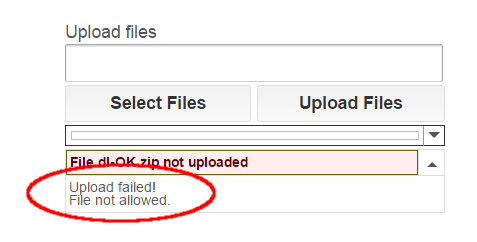
The error means the file was rejected because either its extension or its filename was not allowed. Here is what to check.
Check the file extension
Start by checking the file extension, following the instructions in the Allowed File Types of Iptanus File Upload Plugin article.
Check the filename
If the extension is fine but the error persists for some files, check the filename next. Files whose names contain more than one dot — for example myfile.1.jpg — are not allowed by default, to protect the site from double extension attacks. This behaviour is controlled by the Wildcard Asterisk Mode setting, in the Advanced tab of the plugin’s page in the Dashboard. To lift the restriction on dots, set it to loose.

Why the policy is strict
Iptanus File Upload applies a strict policy to the names and types of uploaded files. It is one of the plugin’s security measures, and it exists to protect the site against hacking attempts. There is a detailed description in the Iptanus File Upload Security article.
If you have any questions, or need further help, please contact us.
The Iptanus team
Hi, you can find the shortcode here: https://controlc.com/912ccfc6
(I get a security error when I try to paste the shortcode here)
You have set Allowed File Extensions to be empty. You need to restore the default value *.* or set a more specific list of allowed extensions.
Regards
Nickolas
Oh yes wow I missed that
Thanks for the help!
Never mind on my previous question. I figured it out. Needed to set “WFU_SANITIZE_FILENAME_DOTS” = “false” in my functions.php. Working as planned now.
Thanks!
Hello
I get this error, but I believe it is something to do with the file content. Could that be true? If so, what?
I am using the plugin to upload a .csv file of a specific, exact name, e.g. “myfile.csv”
Depending on the content of the file, sometimes the upload is successful, but sometimes I get this error.
The filename is always the same. Only the content varies.
The file is only about 44KB.
I am deleting content to try to find what causes the fail, but it’s a bit fiddly. I haven’t yet narrowed down the problem.
Can this error depend on file content please?
If so, are there specific characters in the file etc it might not like? Or anything similar? Maybe line length?
Thanks
Patrick