

The Iptanus File Upload plugin can put a captcha on your upload form, so that robots cannot use it to upload files unattended.
Which captcha the plugin uses
It uses Google reCAPTCHA, in both the older and the newer version:
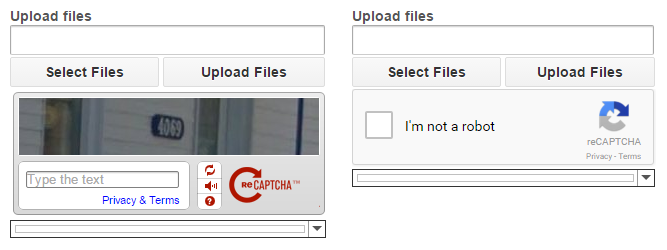
To show one, edit the shortcode with the Shortcode Composer, switch on Include Captcha and pick a type from the list:

The four captcha types
- RecaptchaV1 — reCAPTCHA version 1. Google retired this version in 2018, so choose it only if you have a particular reason to.
- RecaptchaV1 (no account) — the same version, without keys of your own.
- RecaptchaV2 — reCAPTCHA version 2, the one to use.
- RecaptchaV2 (no account) — version 2, without keys of your own.
With your own keys
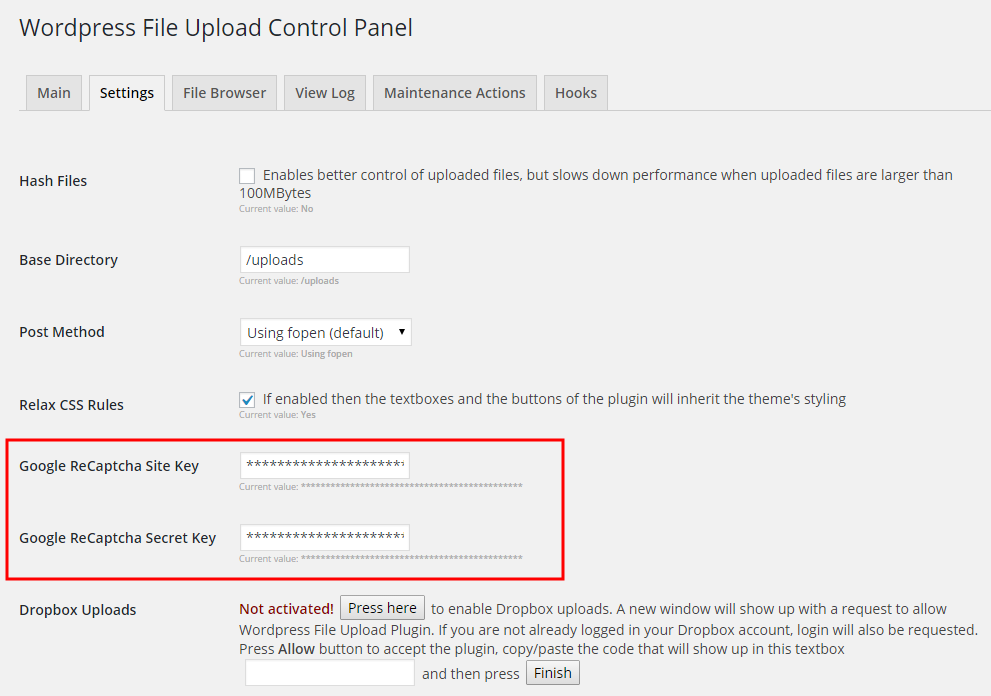
Choosing RecaptchaV1 or RecaptchaV2 means supplying your own reCAPTCHA keys. Get them from Google’s reCAPTCHA site with your Google account, and enter them in the plugin’s settings:
Without keys
The two (no account) options generate the captcha on Iptanus’s own servers, so no keys are needed. They are the answer if you have no Google account, or if you want more than one captcha on the same page — something reCAPTCHA v1 cannot otherwise do. If you are curious how it works, we have written up the whole procedure.
For more information or questions, please contact us.
The Iptanus team
I added the site key and private key, the captcha displays, and when you click it it provides the green check box meaning all is well (not a robot), but when the “Upload File” button is then enabled and pressed, it says “Unknown Captcha Error!” and surrounds the captcha with a bright red box.
I have tried everything. Please help!
Hi, what is the URL of the page to try myself?
Regards
Nickolas
Is there a way to send it private? The site is not yet published.
Hi, how can i control the size of captcha windows, because it shows me the checkbox windows first , but when i click on i am not a robot it change to select the picture with trafficlight (for example) , but i cannot see any picture because the windows is small and dont change the height and width. Thanks