
The Professional version of Iptanus File Upload updates itself, like the free version does. From the plugin’s Plugins page you are told when a new version is out and can install it in one click.
Occasionally you will want to install a version by hand instead — to move to a build you have downloaded from your order, or to recover an installation whose automatic updates are not working. This guide covers that.
The steps
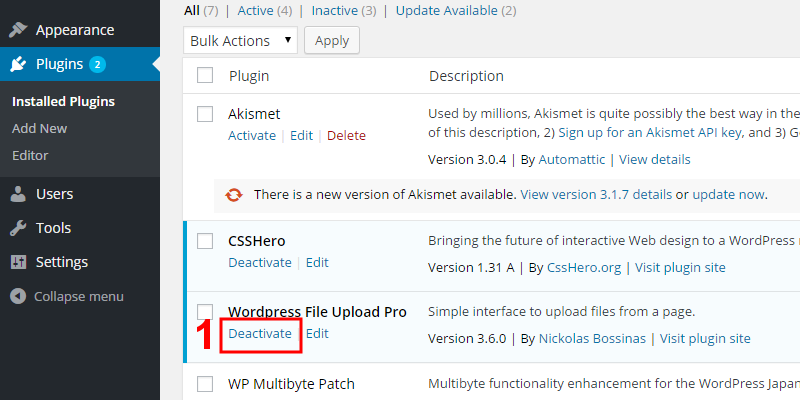
1. Go to Dashboard → Plugins and deactivate the Professional version you have:
2. Then delete it:

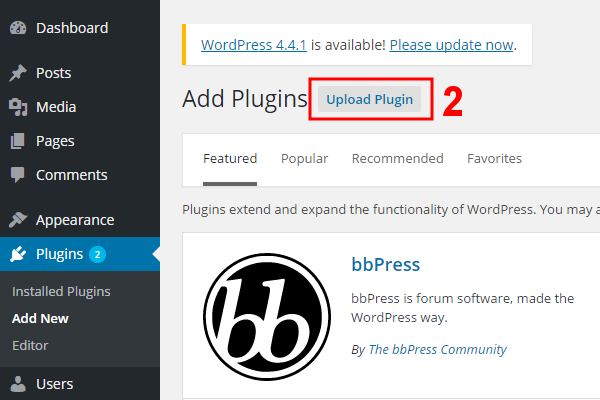
3. Install the new version from the .zip file you downloaded from your Iptanus account, and activate it:



Deleting the old version first does not lose your settings — they survive the whole procedure.
If automatic updates are not working
On version 4.13.1 or earlier, automatic updates stopped working when the third-party service that delivered them shut down. Installing the current version by hand, as above, fixes it — and there is a separate article covering that case, including a way to update through the Dashboard if you would rather.
If you have questions or need more information, please contact us.
The Iptanus team
Ask a question
Answered by Iptanus, usually within a working day.