
This article explains which file types the Iptanus File Upload plugin allows, and how to change the list.
Why the error appeared
After updating the plugin to version 3.9.0 or newer, many users started seeing an error that had not appeared before: “Upload failed! File not allowed.“
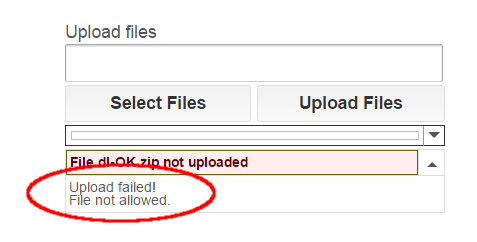
It is caused by the plugin’s security policy, which changed in that version to restrict the file types that can be uploaded. The point of the change is to protect sites better against attacks such as arbitrary file uploads.
The whitelist
Under the new policy, the default *.* in the plugin’s Allowed File Extensions option no longer permits every file type — only a specific set. Administrators are strongly encouraged to define their own list of allowed extensions rather than leave the generic *.* in place.

The blacklist
Even with a list of your own, not every extension on it is guaranteed to work. The plugin also keeps a list of forbidden extensions, and it checks that list first: anything on it is rejected whatever your settings say.
Check an extension
To find out whether an extension is allowed by default, needs adding to Allowed File Extensions, or is forbidden outright, type it below and press Check.
Why would STL be limited? Would be perfect for say, uploading a 3D model for printing…
Yes indeed, however stl extension may also represent “C++ standard template library” files, which contain script. So, being on the safe side for protecting the websites, this extension is blacklisted (together with another 2503 ones).
Regards
Nickolas
Hi Nickolas,
I’m not clear on how to do this–basically, I want to allow your default whitelist PLUS some additional extensions that are neither on the whitelist or the blacklist. How would I go about doing that?
Thanks,
Adam
Hi, you can set extensions in Allowed File Extensions option of the shortcode like this: *.*, *.ext1, *.ext2, *.ext3 and so on.
Here is an article explaining file extensions support.
Regards
Nickolas
The theme also seamlessly supports McAlister’s new Atomic Blocks project, a collection of page-building blocks included in the accompanying Atomic Blocks plugin. It currently includes blocks for creating a post grid, call-to-action, testimonials, inline notices, sharing icons, author profiles, accordions, customizable buttons, drop caps, and spacer/dividers, with many more blocks planned.