
This article explains which file types the Iptanus File Upload plugin allows, and how to change the list.
Why the error appeared
After updating the plugin to version 3.9.0 or newer, many users started seeing an error that had not appeared before: “Upload failed! File not allowed.“
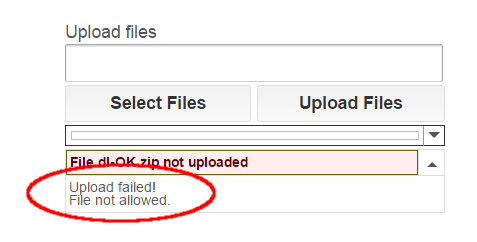
It is caused by the plugin’s security policy, which changed in that version to restrict the file types that can be uploaded. The point of the change is to protect sites better against attacks such as arbitrary file uploads.
The whitelist
Under the new policy, the default *.* in the plugin’s Allowed File Extensions option no longer permits every file type — only a specific set. Administrators are strongly encouraged to define their own list of allowed extensions rather than leave the generic *.* in place.

The blacklist
Even with a list of your own, not every extension on it is guaranteed to work. The plugin also keeps a list of forbidden extensions, and it checks that list first: anything on it is rejected whatever your settings say.
Check an extension
To find out whether an extension is allowed by default, needs adding to Allowed File Extensions, or is forbidden outright, type it below and press Check.
thanks boss. worked now
Hi there
I would like to purchase the pro version but i have some problem using the free version:
1. i want to upload .stl and .obj file, but your plugin have forbidden due to security issue, please advise.
2. I setup my upload path as “uploads/users/%username%” and enabled “Create Upload Path”, however when i test try to upload a .doc file, the file goes to /uplaods/2017/10. Please advise.
3. Continuing from question 2, after i successfully uploaded the .doc file, no successfully message pop-up.
4. I added drop down in the “additional fields”, so after my visitors successfully uploaded their files, where does the “additional fields” information be shown?
5. I have chosen upload roles as all users except guest. When i surf my web as a guest, there is no upload area be showing on the page. Can the plugin be adjusted to give notice to the visitors to sign in instead of hiding the upload area?
Thanks
Patrick
Hi, here are answers:
1. Indeed stl and obj extensions are forbidden. You can override this restriction by adding a Hook (this is a Pro version feature). You can also do it in Free version by adding some lines of code in functions.php file of your theme as follows:
global $wfu_extension_blacklist;if ( isset($wfu_extension_blacklist["obj"]) ) unset($wfu_extension_blacklist["obj"]);
if ( isset($wfu_extension_blacklist["stl"]) ) unset($wfu_extension_blacklist["stl"]);
2. Have you enabled “Add Uploaded Files to Media” or “Attach Uploaded Files to Post” options? These will force the plugin to override uploadpath and upload the files to the default upload folder of WordPress.
3. Have you made any changes to placements attribute? There is a ‘message’ block that displays information about the upload.
4. It is shown in View Log and File Browser in plugin’s area in Dashboard and it can also be added to the notification email. The Pro version also includes file viewers for normal users (not admins), where you can also include this info.
5. Good point! I hadn’t thought of this. It can be done, though it is not so straightforward and requires some code tweaks and Hooks of the Pro version. Nevertheless, I will mention it to include an easy way to do it in the next version.
Regards
Nickolas
Hi Nickolas, I have a pro version.
1)
I need to upload file with .stl,*.dentalCAD,*.dentalProject extension.
I created a hook with this code inside and activated it. I have extensions in shortcode also.
global $wfu_extension_blacklist;
if ( isset($wfu_extension_blacklist[“stl”]) ) unset($wfu_extension_blacklist[“stl”]);
if ( isset($wfu_extension_blacklist[“dentalCAD”]) ) unset($wfu_extension_blacklist[“dentalCAD”]);
if ( isset($wfu_extension_blacklist[“dentalProject”]) ) unset($wfu_extension_blacklist[“dentalProject”]);
Uploading does not work.
Please help.
2) I need to upload file that have a “-” in them or a “_” or a space.
Best regards
Hi, you do not need to put dentalCAD and dentalProject lines inside the hook, they are not blacklisted, just leave the first two lines.
You need also to set Allowed File Extensions in the shortcode like this: *.stl, *.dentalCAD, *.dentalProject
Please also activate option “Do not Change Filename” in the shortcode, so that files with -, _ and spaces do not change their filename.
Nickolas
Perfect, very thanks Nickolas.