
This article explains which file types the Iptanus File Upload plugin allows, and how to change the list.
Why the error appeared
After updating the plugin to version 3.9.0 or newer, many users started seeing an error that had not appeared before: “Upload failed! File not allowed.“
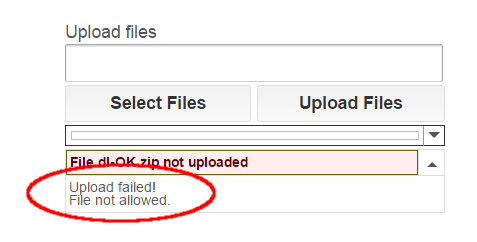
It is caused by the plugin’s security policy, which changed in that version to restrict the file types that can be uploaded. The point of the change is to protect sites better against attacks such as arbitrary file uploads.
The whitelist
Under the new policy, the default *.* in the plugin’s Allowed File Extensions option no longer permits every file type — only a specific set. Administrators are strongly encouraged to define their own list of allowed extensions rather than leave the generic *.* in place.

The blacklist
Even with a list of your own, not every extension on it is guaranteed to work. The plugin also keeps a list of forbidden extensions, and it checks that list first: anything on it is rejected whatever your settings say.
Check an extension
To find out whether an extension is allowed by default, needs adding to Allowed File Extensions, or is forbidden outright, type it below and press Check.
Any way to include .tar.gz files?
Since they have 2 . dots in the extension
Actually files with . dots in them.. I am trying to upload files e.g. “otrs-5.5.1.5.tar.gz”
Hi, go to Advanced tab in plugin’s area in Dashboard, locate option Wildcard Asterisk Mode and set it to loose. This will allow files with many dots.
Regards
Nickolas
The issue I’m having is that file types that have a “-” in them or a “_” or a space or don’t have a file extension are all not allowed. This is a problem because smartphones automatically add many of those characters. e.g.” file-name.jpg”, “file_name.jpeg”, “file name.jpg” or “filename” all do not work for me.
Is there a wildcard for numbers? We want files that have revisions extensions at the end of the file names that are numbers. Do I need to add *.1,*.2,*.3,*.4,*.5 etc to the allowed file extensions? I would need to do this up into the hundreds.
Hi, this is a bit more complicated, it cannot be done with allowed file extensions only, it requires a hook. I have answered to your email directly about this.
Regards
Nickolas
Hi,
Can you please help with mine? Cant get .eps to work
Regards
Mike
Hi, you need to add *.eps in Allowed File Extensions in the shortcode, or *.*,*.eps
Regards
Nickolas