

An earlier article explained how to use CSS to style the Iptanus File Upload plugin so that it matches the colours and fonts of your theme. This one covers the setting that makes that far less work.
Why the plugin looks the same in every theme
By default the plugin styles its own HTML elements so that they look the same whatever theme is active. It does this with strict CSS: it applies enough rules to override whatever the theme would otherwise impose.
Matching your theme the hard way
That makes matching the theme’s colours and fonts harder than it should be, because every one of the plugin’s rules has to be overridden in turn. Below, the first picture shows the plugin’s default appearance in a colourful theme — Dine With Me — and the second shows what we want instead:

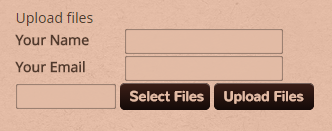
Getting there means putting the following rules into the theme’s Custom CSS area, or into the plugin’s shortcode:
span.file_title_clean {
  color: #513a2d;
}

input[type="text"].file_userdata_message, input[type="text"].file_userdata_message_required {
  background-color: #E3BBA5;
  box-shadow: 0 0 2px black inset;
  margin: 0;
  padding: 6px 8px;
  border-width: 0;
}

.file_userdata_label {
  color: #513a2d;
  line-height: 1.5em;
}

input[type="text"].file_input_textbox {
  background-color: #E3BBA5;
  opacity: .9;
  border-width: 0;
  box-shadow: 0 0 2px black inset;
  padding: 6px 8px;
}

form.file_input_uploadform input[type="button"].file_input_button, form.file_input_uploadform input[type="button"].file_input_button_hover, input[type="button"].file_input_submit, input[type="button"].file_input_submit:hover, input[type="button"].file_input_submit:disabled, input[type="button"].file_input_submit:focus {
  padding: 4px 10px;
  background-color: #140a08;
  background-image: -webkit-linear-gradient(top, #3c1f17, #140a08);
  background-image: -moz-linear-gradient(top, #3c1f17, #140a08);
  background-image: -o-linear-gradient(top, #3c1f17, #140a08);
  background-image: linear-gradient(top, #3c1f17, #140a08);
  border: 0;
  color: #e3bba5;
  border-radius: 5px;
}
The Relax CSS option
Since version 3.2.0 the plugin can relax the rules it applies to its own elements. The setting is in the plugin’s Settings in the Dashboard, and it leaves the buttons and text boxes with only minimal styling, so your theme’s own styles come through. Switched on, and with no custom CSS at all, the form looks like this:
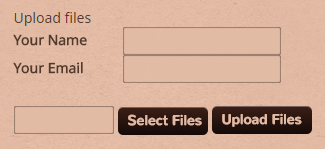
That is very nearly what we wanted: the plugin has picked up the theme’s colours and styles by itself. One rule finishes the job:
form.file_input_uploadform {
  margin: 0;
}
So if you want the plugin to sit comfortably inside your theme, switch Relax CSS on first and add CSS only where it is still needed.
If you have questions, please contact us.
The Iptanus team
when i install your plugin my style go in error and my site become unformatted, my slideshow become little little
how can i disable interference css your plugin with my theme ?
i have used “Relax CSS” but with none effect..
thanks
I installed the pro version and have edited or added some custom css, however I can not figure out how to change the css for an additional user field that is multitext. Simple text fields are changing colors and size, etc. But nothing I have tried can change a multitext field.
Hi, please send me the URL of the page so that I can have a look myself and propose some css.
Regards
Nickolas
heya, loving the plugin but I have a couple of questions… the text field are super squashed so much that they hide the information fields. How can I stretch them so that you can actually see name, email address etc… Thanks so much
question 2) for the email notification section… what is the standard email address to be sent from? I’ve tried to search this and not waste your time but I still really don’t understand. Thanks!!
Hi, there is a Dimensions tab in the visual editor of the plugin, where you can define width and height of plugin’s elements.
Regarding email notifications, the standard email is the one defined in Dashboard/Settings/Writing. You can change it by adding ‘From’ headers in Notification Headers using the visual editor.
Regards
Nickolas