
Iptanus File Upload

Front-end file uploads for WordPress

Let visitors upload files from any page, post or sidebar widget — into your Media library, or straight to Dropbox, Google Drive, OneDrive, Amazon S3 or an FTP server.

Iptanus File Upload

What it does

A form on any page

One shortcode, or a Gutenberg block. Add your own fields, filter by size, extension or user role, and run several forms in the same post.

Files go where you need

The Media library, a NextGEN gallery, an FTP server or a cloud account. Large files upload in chunks, past the server’s own limit.

You see what arrives

A file browser and activity log in the dashboard, email notifications on upload, and a viewer your logged-in users can see too.

What it looks like
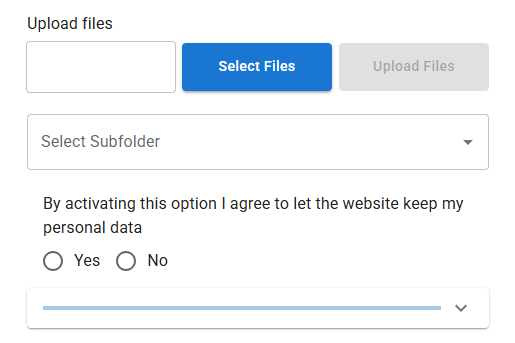
The upload form, as a visitor sees it
The Iptanus File Upload form as a visitor sees it: a file field with Select Files and Upload Files buttons, a subfolder chooser, a consent question, and a progress bar
The default form. Fields, buttons, labels and colours are all configurable.

Set-up and reference

Install it
  1. Install the plugin with the WordPress auto-installer, or download the .zip file from wordpress.org and install it from the Plugins section of your Dashboard.Or copy the wordpress_file_upload directory into the wp-content/plugins directory of your site yourself.
  2. Activate the plugin from the Plugins section of your Dashboard.
Put it on a page
  1. For an upload form, go to Dashboard / Settings / Iptanus File Upload and follow the instructions in Uploader Instances.[wordpress_file_upload]Or put the shortcode straight into the contents of any page.
  2. For a list of uploaded files, follow the instructions in Uploaded File List Instances instead.[wordpress_file_upload_browser]Or put the shortcode straight into the contents of any page.
Once it is running
  1. Open the page in your browser and you will see the upload form, or the list of files.
  2. View what has arrived from the Uploaded Files item in the Dashboard menu.
  3. Change the upload directory, or any other setting, from the small edit button at the top-left corner of the upload form.It opens the plugin options in a new window. If nothing appears, allow pop-up windows for your site.
  4. Full documentation of the plugin options is in the Options section below.

A handy Getting Started guide can be found here.

You can download the free version of the plugin by pressing the FREE version button below, or you can go for the professional version that offers multiple file uploads, captcha and much more by pressing the PRO version button. Professional licences are one-off, and their updates never expire.

Free versionPro version

The plugin offers many options for the two shortcodes, so that they can be tailored to any requirements. These options are available in the following links:

From version 2.4.1 filters and actions are supported in order to allow programmers to integrate Iptanus File Upload plugin with other plugins, extend its capabilities or perform advanced operations.

A detailed list of the plugin’s filters and actions can be found in this article.

The plugin is translated in the following languages:

Portuguese
kindly provided by Rui Alao
German
French
kindly provided by Thomas Bastide of omicronn.fr
Serbian
kindly provided by Andrijana Nikolic of webhostinggeeks.com
Dutch
kindly provided by Ruben Heynderycx
Chinese
kindly provided by Yingjun Li
Spanish
kindly provided by Marton
Italian
kindly provided by Enrico Marcolini marcuz.it
Polish
Swedish
kindly provided by Leif Persson marcuz.it
Persian
kindly provided by Shahriyar Modami chabokgroup.com
Greek

Translations in other languages are more than welcome!.

The plugin requires to have Javascript enabled in your browser. For Internet Explorer you also need to have Active-X enabled.

Please note that old desktop browsers or mobile browsers may not support all of the above features. In order to get full functionality use the latest versions of browsers, supporting HTML5, AJAX and CSS3.

You can read the Privacy Policy and Terms of Service of the plugin in the following links:

You can also read the Google Drive Privacy Policy and Terms of Service of the plugin in the following links:

Release notes

153 versions · 847 changes

What changed in each version. Grouped by major release — these entries carry no dates.

12 releases · 5.0.0 – 5.1.10 5 carry a security fix
  • Fixed bug where emails could not be sent after the release of the previous version.
  • Verified compatibility with latest 7.0 WordPress version.
  • Added uploadid length check in wfu_ajax_action_send_email_notification().
  • Added wfu_params_*, wfu_gst_* and wfu_userstate_* in periodical cleanup.
  • Added Transient Options section in Maintenance Actions tab.
  • Fixed SQL injection issue CVSS 9.3 from Patchstack.
  • Fixed File Overwrite Race Condition when uploading files with the same filename concurrently.
  • Verified compatibility with latest 6.9 WordPress version.
  • Fixed bug where a file could not be downloaded from Uploaded Files Dashboard menu.
  • Fixed double-escaped HTML code of text when Pro version is deactivated. Pro
  • Added support for FTP over TLS (FTPS) uploads.
  • Fixed bug where the visual editor of the file viewer could not be invoked when there was no upload form on the same page. Pro
  • Fixed bug where alt text and description in NGG image was not stored because NGG modified its API. Pro
  • Fixed bug where the visual editor threw warnings for not finding personaldata when Personal Data were deactivated from the plugin's Settings in Dashboard.
  • Fixed bug where a fatal error was thrown when updating the Pro version of the plugin and the extensions had to be reloaded. Pro
  • Fixed bug where Link and Remotelink columns showed HTML code instead of links, due to excessive escaping. Pro
  • Modified Messenger activation workflow due to withdrawal of Send To Messenger plugin from Meta. Pro
  • Corrected bug where the upload form visual editor was not opening when Material UI theme was active.
  • Corrected bug where notification emails were not sent when Material UI theme was active.
  • Updated vendor libraries.
  • Removal of Post Method setting from free version.
  • Removal of curl_exec, file_get_contents and sockets from wfu_get_request() and wfu_post_request() of free version.
  • Improvements on how AJAX endpoint is provided.
  • Corrections to "Requires at least" value.
  • Replacement of eval() in minification function.
  • Corrected warning where translatable constants where loaded before the plugin textdomain was loaded.
  • Further security improvements for compliance with wordpress.org.
  • Added translation for all backend of the plugin.
  • Modified plugin code so that all echoed variables to HTML are escaped.
  • Modified code so that all input is sanitized, including all $_SERVER, $_COOKIE and $_SESSION input.
  • Plugin name changed to Iptanus File Upload.
80 releases · 4.0.0 – 4.25.3 21 carry a security fix
                                                                                                                                                                  32 releases · 3.0.0 – 3.11.0 4 carry a security fix
                                                                                                                                                                                                                                  29 releases · 2.0.1 – 2.7.6 5 carry a security fix

                                                                                                                                                                                                                                                                                            Every version on one page, without JavaScript: the full changelog.

                                                                                                                                                                                                                                                                                            Free and Pro

                                                                                                                                                                                                                                                                                            The free version does not expire and is not a trial. Pro adds nineteen features. The full comparison and the price are on one page.

                                                                                                                                                                                                                                                                                            See pricing

                                                                                                                                                                                                                                                                                            894 discussions

                                                                                                                                                                                                                                                                                            Most recent: October 2025

                                                                                                                                                                                                                                                                                            Questions answered by Iptanus and other users.

                                                                                                                                                                                                                                                                                            1. Hello.
                                                                                                                                                                                                                                                                                              My problem with upload to external ftp server – not same domain as wordpress.

                                                                                                                                                                                                                                                                                              Shortcode:
                                                                                                                                                                                                                                                                                              [wordpress_file_upload uploadpath=”Uploads/%username%” uploadrole=”administrator,author” maxsize=”1000″ createpath=”true” accessmethod=”ftp” ftpinfo=”xxx\:xxx\@ftp3.taniadrukarnia.eu” useftpdomain=”true” dublicatespolicy=”maintain both” adminmessages=”true” forceclassic=”true” debugmode=”true” widths=”progressbar:300px” heights=”progressbar:10px”]

                                                                                                                                                                                                                                                                                              File size < 100 kB

                                                                                                                                                                                                                                                                                              This plugin creates a directory, but does not upload the file.
                                                                                                                                                                                                                                                                                              Answer:
                                                                                                                                                                                                                                                                                              Upload failed!
                                                                                                                                                                                                                                                                                              Targer folder doesn't exist.
                                                                                                                                                                                                                                                                                              Failed upload path: ftp://xxx:xxx@ftp3.taniadrukarnia.eu/Uploads/slasze/4062759009.pdf

                                                                                                                                                                                                                                                                                              Username and password do not contain special characters (:;!@ etc.)

                                                                                                                                                                                                                                                                                              Where do bug?

                                                                                                                                                                                                                                                                                              Slasze

                                                                                                                                                                                                                                                                                              1. Is ftp3.taniadrukarnia.eu/Uploads/slasze/ the correct folder where the files should go? Have you checked with an FTP client to see that it does exist?

                                                                                                                                                                                                                                                                                                1. Yes, the directory is correct and can see it by ftp client. “Uploads” directory I created, and the subdirectory “slasze” created a plugin – variable “%username%”.
                                                                                                                                                                                                                                                                                                  I have just removed the subfolder “slasze” and run plugin. Subfolder “Uploads/slasze” has been created, but the file transfer failed.

                                                                                                                                                                                                                                                                                                  ftp server log:
                                                                                                                                                                                                                                                                                                  “mar 14 09:19:55 serwer proftpd[11694] serwer.taniadrukarnia.eu (31.170.166.21[31.170.166.21]): FTP session opened.
                                                                                                                                                                                                                                                                                                  mar 14 09:19:56 serwer proftpd[11694] serwer.taniadrukarnia.eu (31.170.166.21[31.170.166.21]): Preparing to chroot to directory ‘/home/tdrukarnia/ftp’
                                                                                                                                                                                                                                                                                                  mar 14 09:19:56 serwer proftpd[11694] serwer.taniadrukarnia.eu (31.170.166.21[31.170.166.21]): USER xxx: Login successful.
                                                                                                                                                                                                                                                                                                  mar 14 09:19:56 serwer proftpd[11694] serwer.taniadrukarnia.eu (31.170.166.21[31.170.166.21]): FTP session closed.”

                                                                                                                                                                                                                                                                                                2. Trying to upload a larger file 11MB.

                                                                                                                                                                                                                                                                                                  ” Upload failed! Unknown error.
                                                                                                                                                                                                                                                                                                  Failed upload path: Arts_black_and_white.rar
                                                                                                                                                                                                                                                                                                  fileupload:
                                                                                                                                                                                                                                                                                                  Request Entity Too Large
                                                                                                                                                                                                                                                                                                  The requested resource
                                                                                                                                                                                                                                                                                                  /wp-admin/admin-ajax.php
                                                                                                                                                                                                                                                                                                  does not allow request data with POST requests, or the amount of data provided in the request exceeds the capacity limit.”

                                                                                                                                                                                                                                                                                                  It seems that it is not exercised direct the client to the ftp server, but the file is sent to the hosting with wordpress POST method and only with the server you are connecting with ftp.

                                                                                                                                                                                                                                                                                                  So does this plugin:
                                                                                                                                                                                                                                                                                                  My computer –> (POST method) –> WordPress hosting –> (??? method) –> ftp server

                                                                                                                                                                                                                                                                                                  So it probably should look like:
                                                                                                                                                                                                                                                                                                  My computer –> (tunnel created by plugin – FTP method) –> ftp server

                                                                                                                                                                                                                                                                                            2. Hi

                                                                                                                                                                                                                                                                                              It seems that the plugin is only visible when i am logged in as admin. As soon as i log out, the file upload button on the page disappears. Is there a way to resolve this?
                                                                                                                                                                                                                                                                                              Thanks

                                                                                                                                                                                                                                                                                              1. Yes, this is the default behavior of the plugin. It allows upload of files only to admins. To allow other roles to upload files as well (so the plugin will be visible to them) set attribute uploadrole, e.g. uploadrole=”editor, author”. To allow everyone to upload files (even guests) set uploadrole=”all”….

                                                                                                                                                                                                                                                                                            3. Hello,

                                                                                                                                                                                                                                                                                              I’m trying to use WP File Upload (pro) but i’m unable to upload a file. Even with a basic shortcode.

                                                                                                                                                                                                                                                                                              Failed upload path: img.jpg
                                                                                                                                                                                                                                                                                              fileupload:Session failed!

                                                                                                                                                                                                                                                                                              Session Data:
                                                                                                                                                                                                                                                                                              Array ( )

                                                                                                                                                                                                                                                                                              Post Data:
                                                                                                                                                                                                                                                                                              Array ( [action] => wfu_ajax_action [params_index] => F6QOqyj6FmXbxrxw [subdir_sel_index] => -1 [captcha_challenge] => _0 [chunk_data] => 0,0,0,0, [session_token] => 71553351753277a01a53405.38186980 [unique_id] => g2JoIToqt6 )

                                                                                                                                                                                                                                                                                              I’m using WP 3.8.1 with the Divi Theme from Elegant Theme.
                                                                                                                                                                                                                                                                                              On the same server but in another site with the same version of wordpress, the plugin works.

                                                                                                                                                                                                                                                                                              Anyone can help me please ?

                                                                                                                                                                                                                                                                                              Thanks

                                                                                                                                                                                                                                                                                              1. Hi, I see that session array is empty. This usually happens because another plugin clears session variables (which should not happen). Can you please deactivate your other plugins and try again?

                                                                                                                                                                                                                                                                                                Nickolas Bossinas
                                                                                                                                                                                                                                                                                                http://www.iptanus.com

                                                                                                                                                                                                                                                                                                1. I use Divi theme from Elegant Theme, it can be the problem ?

                                                                                                                                                                                                                                                                                                  My plugins are the followings:

                                                                                                                                                                                                                                                                                                  – Admin bar disabler
                                                                                                                                                                                                                                                                                                  – Contact form 7
                                                                                                                                                                                                                                                                                                  – GA Google Analytics (but I install it after)
                                                                                                                                                                                                                                                                                                  – Google XML Sitemap (installed after too)
                                                                                                                                                                                                                                                                                                  – Shortcodes ultimate
                                                                                                                                                                                                                                                                                                  – Woo Commerce
                                                                                                                                                                                                                                                                                                  – WP Members

                                                                                                                                                                                                                                                                                                  Thanks

                                                                                                                                                                                                                                                                                            Ask a question

                                                                                                                                                                                                                                                                                            Answered by Iptanus, usually within a working day.

                                                                                                                                                                                                                                                                                            Ask a question

                                                                                                                                                                                                                                                                                            This site uses Akismet to reduce spam. Learn how your comment data is processed.

                                                                                                                                                                                                                                                                                            Scroll to Top