
Iptanus File Upload
Front-end file uploads for WordPress
Let visitors upload files from any page, post or sidebar widget — into your Media library, or straight to Dropbox, Google Drive, OneDrive, Amazon S3 or an FTP server.

What it does
A form on any page
One shortcode, or a Gutenberg block. Add your own fields, filter by size, extension or user role, and run several forms in the same post.
Files go where you need
The Media library, a NextGEN gallery, an FTP server or a cloud account. Large files upload in chunks, past the server’s own limit.
You see what arrives
A file browser and activity log in the dashboard, email notifications on upload, and a viewer your logged-in users can see too.
What it looks like
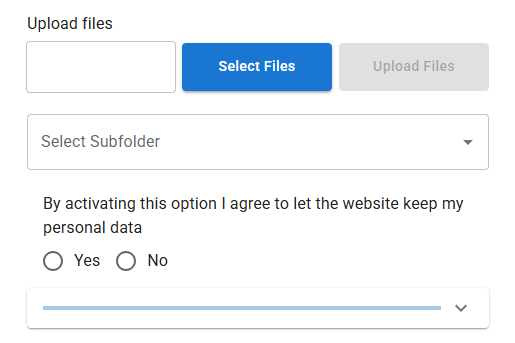
Set-up and reference
- Install the plugin with the WordPress auto-installer, or download the .zip file from wordpress.org and install it from the Plugins section of your Dashboard.Or copy the
wordpress_file_uploaddirectory into thewp-content/pluginsdirectory of your site yourself. - Activate the plugin from the Plugins section of your Dashboard.
- For an upload form, go to Dashboard / Settings / Iptanus File Upload and follow the instructions in Uploader Instances.
[wordpress_file_upload]Or put the shortcode straight into the contents of any page. - For a list of uploaded files, follow the instructions in Uploaded File List Instances instead.
[wordpress_file_upload_browser]Or put the shortcode straight into the contents of any page.
- Open the page in your browser and you will see the upload form, or the list of files.
- View what has arrived from the Uploaded Files item in the Dashboard menu.
- Change the upload directory, or any other setting, from the small edit button at the top-left corner of the upload form.It opens the plugin options in a new window. If nothing appears, allow pop-up windows for your site.
- Full documentation of the plugin options is in the Options section below.
A handy Getting Started guide can be found here.
You can download the free version of the plugin by pressing the FREE version button below, or you can go for the professional version that offers multiple file uploads, captcha and much more by pressing the PRO version button. Professional licences are one-off, and their updates never expire.
The plugin offers many options for the two shortcodes, so that they can be tailored to any requirements. These options are available in the following links:
From version 2.4.1 filters and actions are supported in order to allow programmers to integrate Iptanus File Upload plugin with other plugins, extend its capabilities or perform advanced operations.
A detailed list of the plugin’s filters and actions can be found in this article.
The plugin is translated in the following languages:
- Portuguese
- kindly provided by Rui Alao
- German
- French
- kindly provided by Thomas Bastide of omicronn.fr
- Serbian
- kindly provided by Andrijana Nikolic of webhostinggeeks.com
- Dutch
- kindly provided by Ruben Heynderycx
- Chinese
- kindly provided by Yingjun Li
- Spanish
- kindly provided by Marton
- Italian
- kindly provided by Enrico Marcolini marcuz.it
- Polish
- Swedish
- kindly provided by Leif Persson marcuz.it
- Persian
- kindly provided by Shahriyar Modami chabokgroup.com
- Greek
Translations in other languages are more than welcome!.
The plugin requires to have Javascript enabled in your browser. For Internet Explorer you also need to have Active-X enabled.
Please note that old desktop browsers or mobile browsers may not support all of the above features. In order to get full functionality use the latest versions of browsers, supporting HTML5, AJAX and CSS3.
You can read the Privacy Policy and Terms of Service of the plugin in the following links:
You can also read the Google Drive Privacy Policy and Terms of Service of the plugin in the following links:
Release notes
153 versions · 847 changes
What changed in each version. Grouped by major release — these entries carry no dates.
- Fixed bug where emails could not be sent after the release of the previous version.
- Verified compatibility with latest 7.0 WordPress version.
- Added uploadid length check in wfu_ajax_action_send_email_notification().
- Added wfu_params_*, wfu_gst_* and wfu_userstate_* in periodical cleanup.
- Added Transient Options section in Maintenance Actions tab.
- Fixed SQL injection issue CVSS 9.3 from Patchstack.
- Fixed File Overwrite Race Condition when uploading files with the same filename concurrently.
- Verified compatibility with latest 6.9 WordPress version.
- Fixed bug where a file could not be downloaded from Uploaded Files Dashboard menu.
- Fixed double-escaped HTML code of text when Pro version is deactivated. Pro
- Added support for FTP over TLS (FTPS) uploads.
- Fixed bug where the visual editor of the file viewer could not be invoked when there was no upload form on the same page. Pro
- Fixed bug where alt text and description in NGG image was not stored because NGG modified its API. Pro
- Fixed bug where the visual editor threw warnings for not finding personaldata when Personal Data were deactivated from the plugin's Settings in Dashboard.
- Fixed bug where a fatal error was thrown when updating the Pro version of the plugin and the extensions had to be reloaded. Pro
- Fixed bug where Link and Remotelink columns showed HTML code instead of links, due to excessive escaping. Pro
- Modified Messenger activation workflow due to withdrawal of Send To Messenger plugin from Meta. Pro
- Corrected bug where the upload form visual editor was not opening when Material UI theme was active.
- Corrected bug where notification emails were not sent when Material UI theme was active.
- Updated vendor libraries.
- Removal of Post Method setting from free version.
- Removal of curl_exec, file_get_contents and sockets from wfu_get_request() and wfu_post_request() of free version.
- Improvements on how AJAX endpoint is provided.
- Corrections to "Requires at least" value.
- Replacement of eval() in minification function.
- Corrected warning where translatable constants where loaded before the plugin textdomain was loaded.
- Further security improvements for compliance with wordpress.org.
- Added translation for all backend of the plugin.
- Modified plugin code so that all echoed variables to HTML are escaped.
- Modified code so that all input is sanitized, including all $_SERVER, $_COOKIE and $_SESSION input.
- Plugin name changed to Iptanus File Upload.
Every version on one page, without JavaScript: the full changelog.
Free and Pro
The free version does not expire and is not a trial. Pro adds nineteen features. The full comparison and the price are on one page.
Hi Nickolas
I have the latest Pro version of the plugin and I set up the file transfer to Google Drive a couple of weeks ago and it was working just fine.
Today I noticed that the file transfers to the google drive had stopped, in the File Transfer tab I could see a list of pending transfers and files that were ‘being transferred’ – but after hours, the transfers hadn’t occurred. I tried resetting the transfers in the maintenance tab and manually telling the files to transfer from the File Browser. The issue still persisted.
I then reset the Google Drive Uploads on the settings page, to deactivate it, thinking that I would then try reactivating the function. However, the ‘Press Here’ button to activate the uploads to Google Drive is no longer responsive.
I’ve tried deactivating and then reactivating the plug-in, however the problem persists.
Do you have any ideas? I’d really love to be able to set-up the Google Drive uploads again.
Regards
Hi, did you change anything in your website? theme, PHP or did you add any plugins?
Nickolas
Hi Nickolas,
Thanks for the repsonse.
I didn’t change the theme, PHP or add any new plugins. I would have only updated a few plug-ins with new versions. Do you think I need to go through a trial and error process with the installed plug-ins to see if there is a conflict with any of them?
Regards
If you can then it would be a good idea. Do you have access to the error log of your web server? If yes, do you see any errors there?
Nickolas
Hi Nickolas
Here is the latest error log, unfortunately my knowledge isn’t sufficient to interpret the errors.
[Fri Sep 14 04:01:03.216789 2018] [authz_core:error] [pid 2410103:tid 140070694450944] [client 216.244.66.237:18494] AH01630: client denied by server configuration: /home/mltawa/public_html/wp-content/plugins/akismet/
[Fri Sep 14 01:43:21.037351 2018] [autoindex:error] [pid 2410340:tid 140070702843648] [client 66.249.79.123:25028] AH01276: Cannot serve directory /home/mltawa/public_html/wp-content/plugins/ssl-insecure-content-fixer/nowp/: No matching DirectoryIndex (index.php,index.php5,index.php4,index.php3,index.perl,index.pl,index.plx,index.ppl,index.cgi,index.jsp,index.jp,index.phtml,index.shtml,index.xhtml,index.html,index.htm,index.wml,Default.html,Default.htm,default.html,default.htm,home.html,home.htm,index.js) found, and server-generated directory index forbidden by Options directive
[Thu Sep 13 20:53:18.655287 2018] [authz_core:error] [pid 2214418:tid 140465915369216] [client 46.229.168.83:33090] AH01630: client denied by server configuration: /home/mltawa/public_html/wp-content/plugins/akismet/
[Thu Sep 13 17:27:41.496426 2018] [authz_core:error] [pid 2132630:tid 139925588367104] [client 46.229.168.83:24124] AH01630: client denied by server configuration: /home/mltawa/public_html/wp-content/plugins/akismet/
[Wed Sep 12 13:46:16.977402 2018] [authz_core:error] [pid 782637:tid 139956013860608] [client 144.48.36.69:59812] AH01630: client denied by server configuration: /home/mltawa/public_html/.user.ini, referer: https://mltawa.asn.au/.user.ini
[Mon Sep 10 01:39:17.415086 2018] [authz_core:error] [pid 3555605:tid 139955913148160] [client 66.249.79.102:31562] AH01630: client denied by server configuration: /home/mltawa/public_html/wp-content/plugins/akismet/
[Sun Sep 09 13:46:41.188814 2018] [authz_core:error] [pid 2984664:tid 139955955111680] [client 144.48.36.69:35640] AH01630: client denied by server configuration: /home/mltawa/public_html/.user.ini, referer: https://mltawa.asn.au/.user.ini
[Thu Sep 06 13:47:15.368603 2018] [authz_core:error] [pid 883143:tid 139956005467904] [client 144.48.36.69:29086] AH01630: client denied by server configuration: /home/mltawa/public_html/.user.ini, referer: https://mltawa.asn.au/.user.ini
[Thu Sep 06 07:05:38.650911 2018] [authz_core:error] [pid 883143:tid 139955862791936] [client 46.229.168.81:39990] AH01630: client denied by server configuration: /home/mltawa/public_html/wp-content/plugins/akismet/
[Thu Sep 06 00:34:52.419350 2018] [authz_core:error] [pid 883310:tid 139956030646016] [client 132.232.128.244:46220] AH01630: client denied by server configuration: /home/mltawa/public_html/wp-content/plugins/akismet/mar.php, referer: http://mltawa.asn.au/wp-content/plugins/akismet/mar.php
[Thu Sep 06 00:34:50.238894 2018] [authz_core:error] [pid 883310:tid 139956030646016] [client 132.232.128.244:46220] AH01630: client denied by server configuration: /home/mltawa/public_html/wp-content/plugins/akismet/wamengying.php, referer: http://mltawa.asn.au/wp-content/plugins/akismet/wamengying.php
[Mon Sep 03 13:47:04.517837 2018] [authz_core:error] [pid 3245345:tid 140657276311296] [client 144.48.36.69:
Hi, I think it is truncated, please send it my email at info@iptanus.com
Regards
Nickolas
Hi, Nickolas. I am test driving your plugin before buying the pro version. The page is https://dupuytrens.org/share-your-story/
It uploads files without a hitch.
There are two things which don’t work: the consent checkbox and wording doesn’t display; I receive no notification email.
here’s the shortcode. I’ve replaced my email with a dummy email address to show the formatting:
[wordpress_file_upload uploadpath=”useruploads/%userdata1%” fitmode=”responsive” maxsize=”100″ createpath=”true” forcefilename=”true” subfoldertree=”auto” duplicatespolicy=”maintain both” uniquepattern=”datetimestamp” placements=”userdata/consent/selectbutton/filename/uploadbutton/progressbar/message” uploadtitle=”Upload Images and Videos” selectbutton=”3. Click me to select video or image file to upload” uploadbutton=”4. Click me to upload the selected media file” requiredlabel=”” notify=”true” notifyrecipients=”xxx@xxx.xxx” notifysubject=”Media File Upload Notification” notifymessage=”A new file has been uploaded:%n%%userdata1%” askconsent=”true” personaldatatypes=”userdata and files” consentquestion=”I agree to let the Dupuytren Research Group keep my personal data. Images and video may be used by Dupuytren Research Group for awareness and outreach programs. My contact information will not be released to third parties without my prior written consent.” userdata=”true” userdatalabel=”1. Your words:|t:multitext|s:left|r:1|p:inline/2. Your email:|t:email|s:left|r:1|a:0|v:1|p:right|d:|g:0″ webcam=”true” audiocapture=”true”]
You need to activate Personal Data from plugin’s Settings in Dashboard. Have you done that?
Regards
Nickolas
Followup –
The consent display is intermittent; maybe cache-related. I think it’s OK. But – I still receive no notification email. Thoughts? Thanks!
Check if it went to Spam. If not, you can try to install and configure an SMTP plugin, like WP Easy SMTP.
Regards
Nickolas
Yes, I have. Here are the settings:
========
General Personal Data Options
Ask for Consent ON
Personal Data Types userdata and files
Consent Appearance
Consent Format checkbox
Checkbox Preselected OFF
Consent Question for Checkbox
I agree to let the Dupuytren Research Group keep my personal data. Images and video may be used by Dupuytren Research Group for awareness and outreach programs. My contact information will not be released to third parties without my prior written consent.
Consent Disclaimer Link
Images and video may be used by Dupuytren Research Group for awareness and outreach programs. My contact information will not be released to third parties without my prior written consent.
========
The checkbox did appear earlier in my testing, but I’ve spent a couple of hours since trying to tweak the settings; wouldn’t display properly until I set the plugin css to inherit the site’s style.
Any other thoughts? Thanks!