
This version introduces some new features, improvements and minor bug fixes as follows:
- If the plugin has been configured to show the list of files uploading while the operation is in progress, then the user is able to cancel the upload of each individual file by pressing the cancel button next to the file name:
-

- On some occasions where the WordPress URL is different than Site URL the uploads may fail. A new option, Admin Domain, has been added in plugin’s Settings in Dashboard, to resolve this problem.
- Added attribute browsercss in front-end file viewer’s shortcode that defines custom css for the file viewer.
- Added front-end file viewer hook wfu_browser_check_file_action that is executed when the user attempts to download or delete a file, in order to determine if the action will be accepted or not.
- The front-end file viewer’s attribute columns has been modified in order to allow custom user fields to be separate columns of the file viewer table.
-

- When there are custom user fields that are required, the keyword (required) is added at the end of the field’s label. A new attribute, requiredlabel, is added in the uploader’s shortcode so that the keyword can change. Furthermore, the keyword can now be styled separately from the label using css.
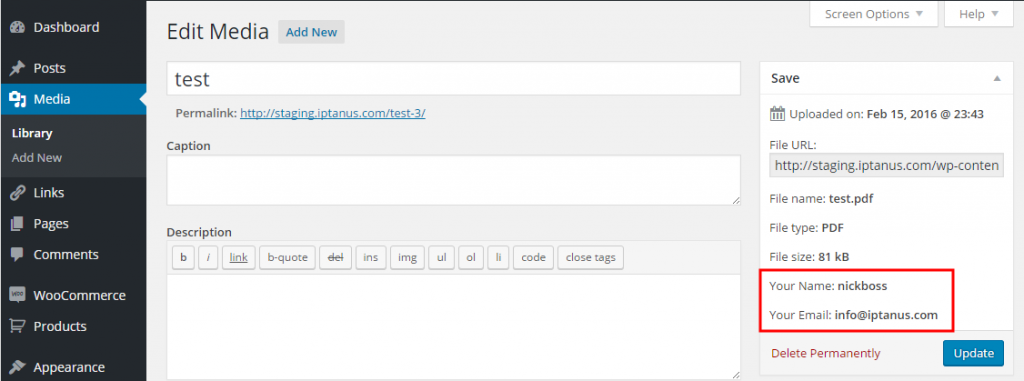
- If the uploader shortcode has been configured to add the uploaded files to Media Library (using medialink attribute), then any custom user fields submitted together with the file will also be included as metadata. Furthermore, a new option has been added in plugin’s Settings in Dashboard to determine if these fields will be shown in Media Library or not.
- Added Dutch translation, kindly provided by Ruben Heynderycx.


You can check details in the Release Notes of the plugin’s support page.
Users who have purchased the Professional version of the plugin can download the latest one by logging into their Iptanus account, selecting the order and downloading the new file. Instructions for installing the new version can be found here.
Users of the Free version can update to the latest one using the Update feature of the Plugins section of their Dashboard.
The Iptanus team keeps working to make WordPress File Upload easier to use and freer of bugs, and will go on issuing new releases. Professional licences are one-off, and their updates never expire.
For any questions, or to report a bug, please contact us.
The Iptanus team
Ask a question
Answered by Iptanus, usually within a working day.